Maintenance & Repairs
Maintenance & Repairs
Maintenance & Repairs
Students who are experiencing issues within their assigned living space or common areas in their hall may submit a work order through our university work order system or through our affilated student housing partners maintenance portal below:
Rowan Works |
Nexus Maintenance Request |
Below are training links for submitting and viewing work orders, as well as instructions for using the mobile app.
Quick Maintenance Tips
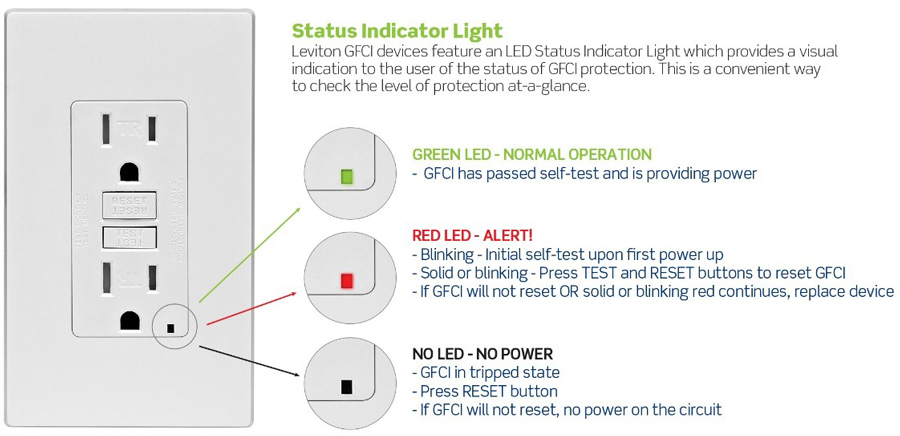
Did your outlets suddenly stop working?
- Check your GFCI outlet and make sure it did not trip- unplug everything in that outlet and click the “reset” button
- If a breaker box is available (gray panel usually found in a kitchen), check that the corresponding breaker was not tripped, if so, flip it back to “on”
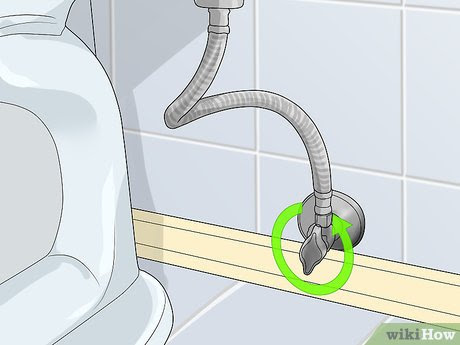
Is your toilet leaking when you flush it or when the tank is filling back up?
Below the bowl of your toilet, you should see an oval valve.
- Following the instructions on the valve, either turn it or pull it towards you to turn off the water in the toilet.
Did your fridge suddenly stop working?
Check the GFCI Outlet
- Locate the outlet your fridge is plugged into (it may have “Test” and “Reset” buttons).
- Unplug all items connected to that outlet.
- Press the “Reset” button to restore power.
Check the Breaker Panel
- Look for the breaker box (a gray panel, usually located in the kitchen or nearby area).
- Open the panel and find the breaker connected to the refrigerator.
- If it appears tripped, flip it fully off, then back on.
If the refrigerator still does not turn on after completing these steps, please submit a maintenance request.
How can I operate my window crank style window?
Operating a Window Crank Style Window (Holly Pointe and Whitney)
Window Operation Instructions
Opening the Window
- Before opening, ensure the window is unlocked. The locking levers should be in the upward (unlocked) position.
- Do not attempt to crank the window open while it is locked, as this can damage the crank mechanism.
- Once unlocked, gently turn the crank to open the window.
Closing the Window
- Turn the crank in the opposite direction to close the window.
- When the window is fully closed and tight against the frame, push the locking levers down to secure it.
- The levers will pull the window tighter into the frame for a proper seal.
If You Feel a Draft
- If the window appears closed but you still feel air coming through, it may not be fully sealed.
- This can happen if the levers were locked before the window was completely shut.
- To fix this:
- Lift the levers to the unlocked (up) position.
- Use the crank to close the window fully.
- Push the levers back down to lock and seal the window properly.
Click the above hyperlink to be directed to a step by step instructions video!
Frequently Asked Questions
What is considered a typical non-emergency work order?
- Any issues/concerns/requests with furniture
- Any issues/concerns with electrical systems (outlets, switches, lights)
- Any issues/concerns with mechanical units (Air Conditioning/Heaters)
- Any issues/concerns with plumbing (Sinks, Showers, Toilets)
- Any issues/concerns with Appliances (Fridges, Microfirdges, Ovens or Stoves)
- Any issues/concerns with Doors or Lock & Key
- Any issues/concerns with pests or animals
- Any issues/concerns with an odor in your space
- Any issues/concerns of damage to walls, floors, ceilings, doors or glass
What is not something that you submit a work order for?
Laundry --> Any laundry machine issues should be reported to Caldwell and Gregory and their support system
Internet/Internet Ports --> Any issues with internet connection should be emailed to support@rowan.edu
Live in NEXUS and have an issue? --> NEXUS apartments do not use RowanWorks. NEXUS properties should fill out a Maintenance Request via the NEXUS website